
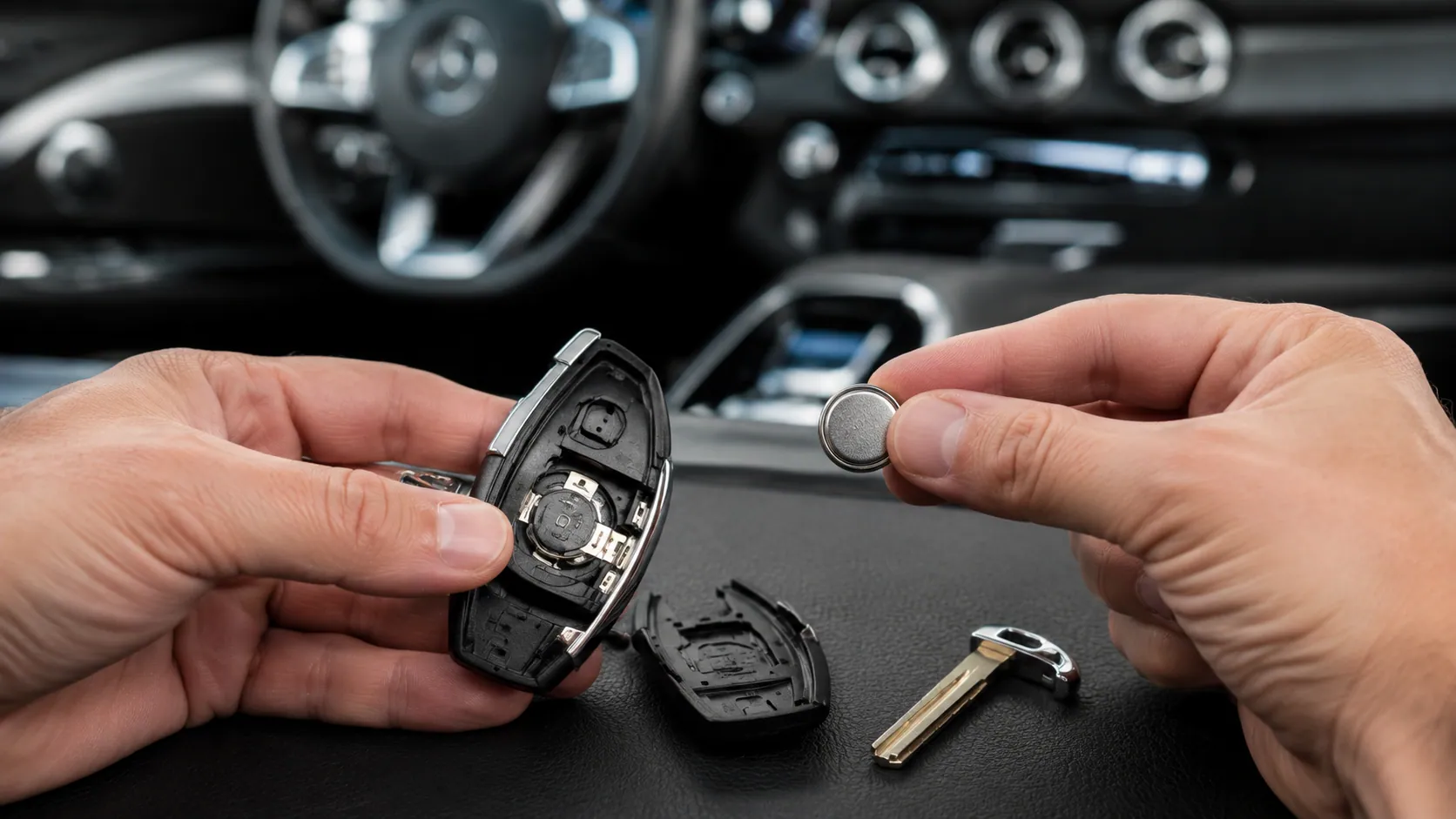
how to change the battery of Mercedes key is a common question when your Mercedes-Benz key fob starts acting weak, stops unlocking the doors, or shows a replace key battery warning on the dashboard. The good news is that Mercedes key battery replacement is usually a simple DIY task if you know your key type, use the correct battery, and open the key fob carefully.
Most Mercedes keys use a small 3V lithium coin battery, often a CR2025 battery or CR2032 battery, depending on the Smart Key, Chrome Key, model, and year. This guide explains how to identify the right battery, open your Mercedes key fob without damage, replace the old battery, test the key, and troubleshoot common problems if the key fob is not working after the battery change.
Quick Answer: What Battery Does a Mercedes Key Use?
Most Mercedes-Benz key fob battery replacement jobs require either a CR2025 or CR2032 3V lithium coin battery. Some older Mercedes SmartKey designs may use two CR2025 batteries, while many newer Chrome SmartKey or modern key fob designs may use one battery.
The safest way to confirm the correct Mercedes key battery type is to open the key fob and read the number printed on the old battery. If the old battery says CR2025, replace it with a CR2025. If it says CR2032, replace it with a CR2032.
Although CR2025 and CR2032 batteries look similar, they are not exactly the same. Both are usually 3V lithium coin batteries, but the CR2032 is thicker. Using the wrong battery may cause poor contact, weak range, or a key fob that does not close properly.
| Battery Type | Common Use | Important Note |
| CR2025 | Often used in many Mercedes SmartKey and Chrome Key designs | Thinner coin cell |
| CR2032 | Used in some Mercedes key fobs depending on model/year | Thicker coin cell |
| 3V lithium coin battery | General category | Always match the old battery number |
Signs Your Mercedes Key Battery Needs Replacement
A weak Mercedes key fob battery usually gives warning signs before it completely dies. One of the first signs is reduced range. You may need to stand closer to the vehicle before the key locks or unlocks the doors.
Another common symptom is an intermittent response. The key may work once, then fail the next time. You may also need multiple attempts or numerous attempts to unlock the vehicle, open the trunk, or use the panic alarm.
Some Mercedes vehicles may show a dashboard warning sign or replace battery warning. This message usually means the key fob battery is low, not that the main car battery has failed. However, if the vehicle is also difficult to start, you should pay attention to both the key battery and the vehicle’s electrical system.
You may need a new battery if:
- The lock and unlock buttons respond slowly.
- The panic alarm stops working.
- The car does not recognize the key during push-to-start ignition.
- The keyless entry function works only at very close range.
- The dashboard shows a replace key battery warning.
When these signs appear, replacing the Mercedes-Benz key fob battery early can prevent a stressful situation later.
Identify Your Mercedes Key Type Before Replacing the Battery
Before you change the battery, identify your Mercedes key type. This matters because the opening method and number of batteries can vary.
Older Mercedes models often use a SmartKey with a plastic body. These keys may have a different battery compartment and may require two CR2025 batteries. Some older SmartKey designs have a circular panic button.
Many newer Mercedes-Benz models use a Chrome Key or Chrome SmartKey. These keys usually have a metal or chrome-style casing and may use one CR2025 battery, although some newer key designs may use a different battery. Some Chrome Key versions have a triangular panic button.
There are also modern Mercedes key fobs with smoother designs, fewer visible seams, and updated internal layouts. For these, the most reliable method is still to check the old battery before buying a replacement.
Key types commonly include:
| Key Type | Common Clues | Battery Notes |
| Older SmartKey | Plastic casing, older Mercedes models | May use two CR2025 batteries |
| Chrome Key / Chrome SmartKey | Chrome or metal-style casing | Often uses one CR2025 battery |
| Newer Mercedes key fob | Updated design, keyless entry features | May use CR2025 or CR2032 |
Because Mercedes key designs vary by model, year, and market, always verify your actual battery before replacing it.
Tools You Need to Change a Mercedes Key Battery
You do not need many tools for a basic Mercedes key battery replacement. In many cases, the mechanical key blade inside the fob is enough to open the battery compartment. Still, it helps to prepare everything before you begin.
You may need a replacement battery, such as a CR2025 battery or CR2032 battery, depending on your key. A small flathead screwdriver or plastic pry tool can help if the battery cover is tight, but you should use it gently to avoid scratching the key shell or damaging the battery contacts.
Work on a clean, dry surface so the old battery, new battery, and small parts do not fall or get lost. Avoid water, moisture, or oily surfaces because the key fob contains small electronic components.
Useful items include:
- Correct battery: CR2025 or CR2032
- Mechanical key blade
- Small flathead screwdriver or plastic pry tool
- Clean, dry workspace
- Soft cloth to protect the key casing
A simple preparation step can prevent damage to the key fob circuit board, battery compartment, or key cover.
How to Open a Mercedes-Benz Key Fob Without Damaging It
Knowing how to open a Mercedes-Benz key fob safely is just as important as replacing the battery. Mercedes keys can be expensive, so do not force the case open.
Start by locating the release button, sliding tab, or small latch on the key fob. Press or slide it to remove the mechanical key blade. This small metal key is used for emergency door access and often helps open the battery cover.
Once the mechanical key is removed, look for an open slot, visible slot, or small gap near the key opening. On many Mercedes key fobs, you can insert the mechanical key blade into this slot and gently press or twist to release the battery compartment.
If your key has a sliding battery cover, slide it in the direction of the arrow or opening groove. If it has a pop-out battery tray, apply gentle pressure only where the key design allows.
Avoid these mistakes:
- Do not force the key cover.
- Do not use sharp tools that can scratch the case.
- Do not bend the battery contacts.
- Do not touch the circuit board unless necessary.
- Do not open the key over water, dirt, or a hard floor.
The goal is to open the battery compartment carefully while keeping the key shell, latch, and internal contacts intact.
How to Change the Battery of Mercedes Key Step by Step
Once you have the correct battery and the key fob is open, the actual Mercedes-Benz key fob battery replacement is usually quick.
Step 1: Remove the Mechanical Key Blade
Press the release button or slide the tab on your Mercedes key fob. Pull out the mechanical key blade or metal key. Place it somewhere safe because you will need it to close the fob or unlock the door in an emergency.
Step 2: Open the Battery Compartment
Use the mechanical key blade to release the battery cover or tray. Be gentle. If the cover does not move, check the slot again instead of forcing it. Different SmartKey and Chrome Key designs open slightly differently.
Step 3: Remove the Old Battery
Before removing the old battery, look carefully at the battery orientation. Notice which side faces up. In many key fobs, the positive side faces up, but you should always check your specific key before removing the battery.
Use your finger or a plastic tool to lift the old battery out. Avoid bending the metal contacts.
Step 4: Insert the New Battery Correctly
Place the new CR2025 battery or CR2032 battery into the same position as the old one. Make sure the battery polarity is correct. If the battery is inserted upside down, the key may not work.
The battery should sit flat and secure inside the compartment. If it feels loose, crooked, or too thick, you may have the wrong battery type.
Step 5: Reassemble the Key Fob
Slide or snap the battery cover back into place. It should close smoothly. If the cover does not close, do not force it. Recheck the battery size and placement.
Then insert the mechanical key blade back into the key fob.
Step 6: Test the Key
After replacing the battery, test the main functions. Try to lock and unlock doors, open the trunk if applicable, press the panic alarm, and start the vehicle using push-button start or push-to-start ignition.
If everything works normally, the replacement is complete.
Mercedes SmartKey vs Chrome Key Battery Replacement
The steps for SmartKey battery replacement and Chrome Key battery replacement are similar, but the number of batteries may differ.
An older SmartKey is often linked to older Mercedes-Benz models and may use two CR2025 batteries. In this case, replace both batteries at the same time. Do not replace only one old battery because the key may still behave weakly.
A newer Chrome SmartKey often uses one CR2025 battery, though you should still confirm by checking the old battery. The Chrome Key may open through a release tab, bottom latch, or battery tray.
The main difference is not just the shape of the key. It is also the battery layout. That is why the best rule is simple: match the old battery number and orientation.
If your key has a circular panic button, it may be an older style. If it has a triangular panic button and metal casing, it may be a newer Chrome Key. However, visual clues are not perfect, so always verify the old battery.
CR2025 vs CR2032: Which Mercedes Key Battery Is Correct?
A common question is whether a Mercedes key uses CR2025 or CR2032. Both are round 3V lithium coin batteries, and both may fit some key fob designs, but they are not identical.
The main difference is thickness. A CR2032 battery is thicker than a CR2025 battery. Even if the battery diameter looks the same, the extra thickness can affect how the battery sits inside the compartment.
If the battery is too thin, it may not touch the contacts properly. If it is too thick, the key cover may not close or the internal contacts may be stressed.
The best method is to remove the old battery and read the printed battery number. If it says CR2025, use CR2025. If it says CR2032, use CR2032.
Do not guess based only on the Mercedes model name. A Mercedes C-Class key battery replacement, Mercedes E-Class key battery replacement, or Mercedes GLC key battery replacement can vary depending on the key design and model year.
Mercedes Key Battery by Model and Year
Many people search for a Mercedes key battery by model or Mercedes key battery by year, but the answer is not always the same for every vehicle. A C-Class, E-Class, S-Class, GLC, GLE, GLS, CLA, AMG, or Sprinter key may use a different key fob design depending on year and market.
For example, an older Mercedes may use an older SmartKey, while a newer vehicle may use a Chrome SmartKey or a modern keyless-entry fob. Some keys may use one battery, while others may use two batteries.
Use this table as a general guide, not a final rule:
| Mercedes Model | Common Search Intent | Best Action |
| C-Class | Mercedes C-Class key battery replacement | Check old battery number |
| E-Class | Mercedes E-Class key battery replacement | Confirm CR2025 or CR2032 |
| GLC / GLE / GLS | SUV key battery replacement | Identify key fob type |
| S-Class | Premium key fob battery replacement | Avoid forcing key cover |
| Sprinter | Mercedes Sprinter key battery replacement | Check key design first |
| AMG models | Mercedes AMG key battery replacement | Match the old battery |
A helpful rule is: model tells you where to start, but the old battery tells you what to buy.
Common Mistakes to Avoid When Replacing a Mercedes Key Battery
Many Mercedes key battery replacement problems happen because of small mistakes. The most common mistake is using the wrong battery type. A CR2025 and CR2032 may look similar, but the wrong one can create poor contact or prevent the key cover from closing.
Another mistake is installing the battery upside down. Always check battery polarity before removing the old battery. The positive side should face the same direction as the original battery.
Some people also force the key cover open. This can damage the key shell, latch, or battery tray. If the cover does not open easily, stop and look for the correct release point.
Avoid touching or bending the battery contacts. These small metal contacts must hold the battery firmly. If they bend, the key may not receive power even with a new battery.
Also, do not forget to test the key after replacement. Test the lock, unlock, panic alarm, and starting function before assuming the repair is complete.
What to Do If Your Mercedes Key Is Not Working After Battery Change
If your Mercedes key is not working after battery change, do not panic. The problem is often simple.
First, check the battery direction. If the battery is upside down, the key will not work. Open the battery compartment and confirm that the positive side and battery placement match the old battery.
Next, confirm the battery type. If your key needs a CR2025 battery but you inserted a CR2032 battery, the key may not close properly or may have poor contact. If your key needs CR2032 but you used CR2025, the battery may be too thin for reliable contact.
Then check the battery contacts. If they look dirty, dusty, or bent, the key may not receive power. Use a dry cloth or gentle cleaning method. Do not use water.
If the Mercedes key fob buttons are not working after battery replacement, try the spare key if you have one. If the spare key works, the issue may be inside the first key fob.
Other causes include moisture damage, physical damage, a damaged circuit board, or a key communication issue. If the vehicle still fails to recognize the key, visit a Mercedes-Benz service center or qualified specialist for professional diagnosis.
How to Unlock and Start a Mercedes with a Dead Key Battery
If your key fob battery is dead, you may still be able to unlock and start your Mercedes. Most Mercedes keys include a mechanical key blade hidden inside the fob.
To unlock the door, remove the mechanical key and use it in the driver’s door lock. Some models have a covered key cylinder, so you may need to gently remove a small cover near the door handle.
Starting the car with a dead key battery depends on the model. Some Mercedes vehicles allow you to hold the key close to the start button, center console, steering column, or a designated backup start location. Others may have a specific keyless start backup slot.
If you are unsure, check the owner’s manual for the exact emergency start procedure for your Mercedes model. The important point is that a dead key battery does not always mean you are completely locked out.
After using the emergency method, replace the battery as soon as possible.
Do Mercedes Keys Need Reprogramming After Battery Replacement?
In most cases, a Mercedes key does not need reprogramming after a simple battery replacement. Changing the battery usually does not erase the key’s programming.
However, if the key still does not work after installing the correct battery, there may be another issue. The problem could be a damaged key fob, poor battery contact, a vehicle recognition problem, or a deeper key communication issue.
Some replacement keys, especially for certain newer vehicles, may require key programming through a dealer or qualified technician. In some cases, you may also need proof of ownership before a replacement key can be ordered or programmed.
So, for a normal battery change, reprogramming is usually not needed. But for a new key, damaged key, or key that no longer communicates with the vehicle, professional help may be required.
Mercedes Key Battery Replacement Cost: DIY vs Dealer
A DIY Mercedes key fob battery replacement cost is usually low because the battery itself is inexpensive. Many coin-cell batteries cost around $5 to $15, depending on brand, store, and package size.
If you go to a Mercedes-Benz service center, dealership, or auto specialist, the cost may be higher because you are paying for convenience, inspection, and professional assistance. Some service departments may replace the battery quickly, while others may charge for labor or recommend a full key inspection.
DIY replacement makes sense if:
- You know the correct battery type.
- The key fob opens normally.
- There is no physical or water damage.
- The key worked before the battery became weak.
Professional help makes sense if:
- The key still does not work after a new battery.
- The key fob is cracked or damaged.
- The battery contacts are bent.
- The vehicle does not recognize the key.
- You need a replacement key or programming.
Where to Buy a Mercedes Key Battery
You can buy a Mercedes key battery from many places. Common options include auto parts stores, electronics stores, supermarkets, pharmacies, online retailers, and a Mercedes-Benz parts department.
Look for reliable battery brands such as Panasonic or Energizer, or any high-quality battery from a trusted seller. Avoid old, leaking, damaged, or unbranded batteries because they may have weak power even if they are new in the package.
If you are unsure whether you need CR2025 or CR2032, bring the old battery with you to the store. A parts counter or battery shop can help match it.
Buying from a Mercedes-Benz parts center may cost more than a regular store, but it can give you confidence that you are using the right replacement battery.
How Long Does a Mercedes Key Battery Last?
A Mercedes key fob battery often lasts around 3 to 4 years, but battery life depends on use, storage, temperature, and key design. Some batteries may last longer, while others may drain faster.
If you use keyless entry, push-button start, and remote functions frequently, the battery may drain faster. Keeping the key very close to the vehicle for long periods may also increase passive communication in some keyless systems.
Extreme temperature changes can also affect battery longevity. Cold weather may make a weak battery fail sooner, while heat and moisture can shorten battery life or damage the key fob.
If your key starts acting weak after several years, replacing the battery is normal maintenance.
How to Make Your Mercedes Key Battery Last Longer
To make your Mercedes key battery last longer, store the key in a cool dry place when it is not in use. Avoid leaving it in direct sunlight, inside a hot car, or near water.
Do not keep the key unnecessarily close to the vehicle for long periods. Some keyless systems may continue low-level communication when the key is nearby, which can affect battery life over time.
Use a good-quality replacement battery instead of the cheapest unknown option. A weak or old battery may fail quickly and cause the same warning signs again.
Also, keep the key fob clean and dry. Moisture damage can create problems that look like a dead battery but are actually internal key damage.
When to Replace the Entire Mercedes Key Fob Instead of the Battery
Sometimes, replacing the battery is not enough. You may need a new Mercedes-Benz key fob if the key has physical damage, water damage, broken buttons, a cracked shell, or damaged internal contacts.
A replacement key may also be needed if the key no longer communicates with the vehicle, even after using the correct new battery. If both your old and spare key fail, the issue may be with the vehicle instead of the key.
To order a replacement key, you may need to visit a Mercedes-Benz dealership or authorized service provider. You may be asked for vehicle information and proof of ownership.
Battery replacement is the first step. But if the key is damaged or unresponsive after proper troubleshooting, professional diagnosis is the safer choice.
Quick Mercedes Key Battery Replacement Checklist
Use this quick checklist before and after replacing the battery:
- Confirm the old battery number: CR2025 or CR2032.
- Remove the mechanical key blade.
- Open the battery compartment gently.
- Check the old battery orientation.
- Remove the old battery without bending contacts.
- Insert the new battery with correct battery polarity.
- Close the key fob carefully.
- Test lock and unlock doors.
- Test the panic alarm.
- Test push-button start or key recognition.
This simple checklist helps prevent common mistakes and ensures the key works before you rely on it.
Frequently Asked Questions About Mercedes Key Battery Replacement
Can I change a Mercedes key battery myself?
Yes, most people can handle DIY Mercedes key battery replacement at home. You only need the correct replacement battery, your mechanical key blade, and a careful approach. If the key is damaged or does not open easily, it is better to get professional help.
Are all Mercedes key batteries the same?
No. Not all Mercedes key batteries are the same. Many keys use a CR2025 battery, while some use a CR2032 battery. Some older keys may use two CR2025 batteries. Always check the old battery before buying a new one.
Which side of the Mercedes key battery faces up?
The correct side depends on your key design, so check the old battery before removing it. In many cases, the positive side faces up, but you should match the original battery orientation exactly.
Why does my Mercedes still say replace key battery?
If your Mercedes still shows a replace key battery warning, the battery may be inserted incorrectly, the wrong battery type may be installed, or the battery contacts may not be touching properly. Try reopening the key and checking the battery placement.
Can I drive with a low key battery warning?
Usually, yes, but you should replace the battery soon. A low key battery may eventually stop working, making it harder to unlock or start the vehicle. Keep the mechanical key blade available in case the key fob battery dies.
Can the wrong battery damage a Mercedes key fob?
The wrong battery can cause poor contact, pressure on the cover, or stress on the battery contacts. It may not immediately destroy the key, but it can create problems. Always use the correct battery size and avoid forcing the key closed.
Do Mercedes keys need reprogramming after battery change?
Usually, no. A normal battery replacement should not reset the key. If the key still does not work, the issue may be poor contact, damage, or a communication problem rather than programming.
Final Thoughts: Replacing a Mercedes Key Battery the Right Way
Learning how to change the battery of Mercedes key can save time, stress, and unnecessary service visits. Most Mercedes key battery replacement jobs are simple when you use the correct CR2025 battery or CR2032 battery, open the key fob carefully, match the old battery orientation, and test the key afterward.
If your Mercedes-Benz key fob still does not work after replacing the battery, check for wrong battery type, poor contact, moisture damage, or physical damage. When in doubt, a Mercedes-Benz service center or qualified technician can help diagnose the issue and confirm whether you need a battery, repair, or replacement key.
Disclaimer: This article is for general informational and educational purposes only and does not constitute automotive, electrical, or professional repair advice. Mercedes key fob designs, battery types, replacement methods, and procedures may vary by model, year, and market. Always verify the battery type and follow manufacturer guidelines or consult a qualified technician for safe replacement and troubleshooting.